File Upload
Complete system design for a production-ready file upload feature using the RADIO framework.
Framework: RADIO
- Requirements
- Architecture
- Data Model
- Interface (API)
- Optimizations
R - Requirements
Understanding requirements through Q&A helps identify architectural decisions and optimizations needed.
Q1: Does it support multiple file uploads?
Answer: Yes, users can select and upload multiple files simultaneously.
Impact on Design:
- Data Model: Need an array structure to track multiple
UploadTaskobjects - UI: Must display a list of progress bars, one for each file
- State Management: Global store to manage multiple upload states
Q2: What is the maximum file size?
Answer: Up to 1GB (supporting use cases like videos, high-resolution scans, large documents).
Impact on Design:
- Optimizations: Must implement Chunked Uploads (splitting files into smaller pieces)
- Network: Need Resumable Upload capability if connection fails
- Memory: Cannot load entire file into memory at once
Q3: Should uploads continue if user navigates to another page?
Answer: Yes, uploads must persist across page navigation.
Impact on Design:
- Architecture: State must live in a Global Store (React Context/Redux)
- Not Component-Level: Cannot use local component state (
useState) - Lifecycle: Must handle component unmount without cancelling uploads
Q4: Do we need image previews before uploading?
Answer: Yes, users should see thumbnails for image files.
Impact on Design:
- Performance: Use
URL.createObjectURL()or Web Workers to avoid blocking main thread - Memory: Generate downscaled thumbnails (e.g., 200x200) not full resolution
- UX: Show preview immediately after file selection (optimistic UI)
Q5: What happens if the network fails during upload?
Answer: System should automatically reconnect and retry.
Impact on Design:
- Optimizations: Implement Retry Logic with Exponential Backoff
- User Control: Provide manual retry button for failed uploads
- Status Tracking: Need error states and retry attempt counters
A - Architecture (High-Level Design)
The architecture follows a layered approach inspired by MVC pattern:
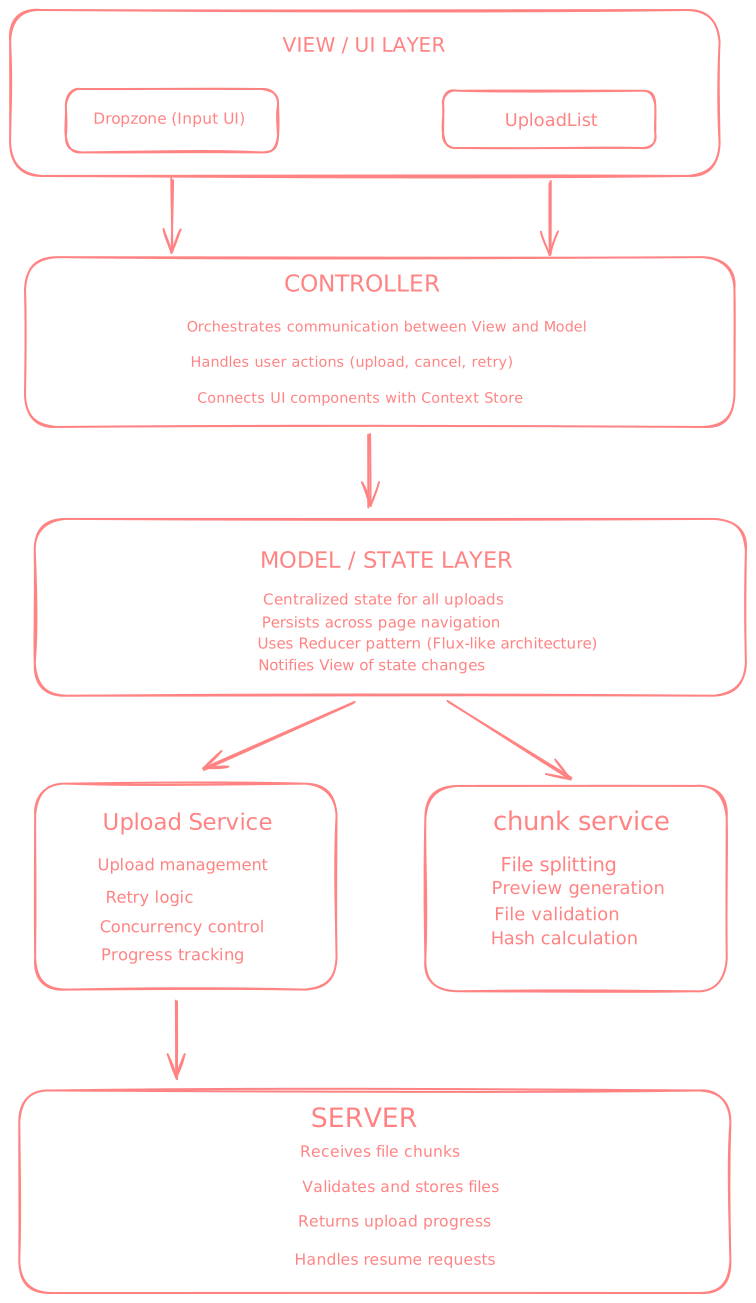
Key Architectural Decisions
View Layer:
- Pure presentational components
- No business logic
- Only handles user interactions and visual feedback
Controller Layer:
- Connects View with Model
- Contains event handlers
- Orchestrates data flow
Model Layer (Services):
- Business logic isolated from UI
- Reusable and testable
- Independent of React
D - Data Model
Core Interface: UploadTask
Each file upload is represented by an UploadTask object with the following structure:
interface UploadTask {
  id: string;                      // Unique identifier (timestamp-based)
  file: File;                      // Browser File object (binary data)
  name: string;                    // File name (e.g., "document.pdf")
  size: number;                    // File size in bytes
  type: string;                    // MIME type (e.g., "image/jpeg", "video/mp4")
  progress: number;                // Upload progress (0 to 100)
  status: 'pending' | 'uploading' | 'completed' | 'error'; // Current state
  preview: string | null;          // Data URL for image previews (thumbnails)
  abortController: AbortController; // For cancelling uploads
  error: string | null;            // Error message if upload fails
  startedAt: number;               // Timestamp when upload started (Date.now())
}
I - Interface (Component Props)
Usage Example:
<FileUpload
  accept="image/*,video/*"
  multiple={true}
  maxSize={1024 * 1024 * 1024}  // 1GB
  showDropzone={true}
/>
O - Optimizations
This section demonstrates advanced system design thinking by addressing real-world challenges in file upload systems. Each optimization solves a specific problem with clear trade-offs.
1. Chunked Uploads
Problem: Uploading large files (e.g., 1GB) as a single HTTP request is fragile and inefficient:
- If connection drops at 99%, user must restart from 0%
- Browser may timeout for very large payloads
- No way to track granular progress during upload
- Entire file must be loaded into memory
Solution:
Split large files into smaller chunks (5MB each) and upload them sequentially. The backend assembles chunks into the complete file after all pieces are received.
Architecture:
- File Analysis: Determine if file needs chunking (files > 5MB)
- Chunk Creation: Divide file into 5MB pieces using
File.slice() - Sequential Upload: Upload chunks one by one with metadata (chunk index, total chunks, file ID)
- Progress Tracking: Calculate overall progress based on completed chunks
- Server Assembly: Backend stitches chunks together in correct order
Benefits:
- Resumability: Only re-upload failed chunks, not entire file (200x less data)
- Granular Progress: Users see progress per chunk, not stuck at single percentage
- Memory Efficiency: Process one chunk at a time, not entire file in memory
- Reliability: Smaller requests less likely to fail or timeout
Trade-offs:
- More HTTP requests (overhead per chunk)
- Backend must support chunk assembly and temporary storage
- More complex error handling (partial failures)
- Requires tracking state for each chunk
2. Retry Logic with Exponential Backoff
Problem: Network failures are common and inevitable:
- WiFi connection drops temporarily
- Server overload returns 503 errors
- Rate limiting kicks in
- Cellular network switches towers
Naive immediate retry can cause worse problems:
- Overwhelm already struggling server
- Waste bandwidth with repeated failures
- Create "retry storms" (all clients retry at once)
Solution:
Implement exponential backoff: wait progressively longer between retry attempts (1s → 2s → 4s → 8s → 16s), with random "jitter" to prevent synchronized retries.
Architecture:
- Attempt Tracking: Count number of retries (max 3 attempts)
- Delay Calculation: Double delay after each failure (exponential)
- Jitter Addition: Add random 0-1s to prevent thundering herd
- Failure Detection: Distinguish temporary (retry) vs permanent errors (give up)
- User Feedback: Show retry attempt number and countdown
Benefits:
- Self-Healing: 95% of temporary network issues resolve within seconds
- Server Protection: Prevents overwhelming server during high load
- Better Success Rate: Gives time for network/server to recover
- User Experience: Automatic recovery without manual intervention
Trade-offs:
- Slower final failure detection (users wait ~30s before seeing permanent error)
- More complex state management (tracking attempts, timers)
- May delay recognition of permanent problems
3. Concurrency Limiting
Problem: Uploading 50 files simultaneously creates multiple issues:
- Browser Limits: Browsers cap concurrent connections per domain (6-8 max)
- CPU/Memory Overload: Too many active uploads cause browser slowdown
- Poor UX: All progress bars move slowly, hard to see which files are active
- Network Congestion: Bandwidth split across too many uploads
Solution:
Implement an upload queue that limits concurrent uploads to 2-3 files at a time. Remaining files wait in queue and start automatically when a slot opens.
Architecture:
- Queue Management: Maintain array of pending uploads
- Concurrency Tracking: Count active uploads (max 2-3)
- Automatic Scheduling: When upload completes, start next in queue
- Priority System: Process files in selection order (FIFO)
- State Synchronization: Update UI to show queue position
Benefits:
- Better UX: Users see clear progress on 2 files, not slow progress on 50
- Browser Efficiency: Respects connection limits, prevents crashes
- Predictable Performance: Consistent upload speeds per file
- Clear Feedback: Easy to see which files are active vs waiting
Trade-offs:
- Files wait in queue (sequential processing takes longer overall)
- More complex state management (queue + active tracking)
- Requires careful handling of cancellation/errors in queue
4. Optimistic UI Updates
Problem: Waiting for server confirmation creates perceived lag and poor UX:
Traditional flow:
- User selects file
- Wait for server to acknowledge
- Then show file in UI ← Delay feels slow
This creates a "dead zone" where user doesn't know if action was received.
Solution:
Update UI immediately when user selects files (optimistic), then handle actual upload in background. If upload fails, update UI to error state.
Architecture:
- Immediate Rendering: Add files to UI instantly upon selection
- Background Processing: Generate previews and start uploads asynchronously
- State Reconciliation: Update UI as real upload progresses
- Error Recovery: If upload fails, show error state with retry option
- Rollback Strategy: Remove failed uploads if user cancels
Benefits:
- Instant Feedback: Zero perceived latency (feels < 100ms)
- Modern UX: Matches behavior of native apps (iOS Photos, Android Files)
- User Confidence: Immediate visual confirmation action was received
- Perceived Performance: App feels faster even if uploads take same time
Trade-offs:
- Must handle rollback scenarios (upload fails after showing success)
- More complex state management (optimistic vs actual states)
- Potential for confusing states if errors not communicated clearly
- Need clear error messaging to maintain user trust
5. Image Preview Generation
Problem: Users want to verify images before uploading, but naively loading images causes issues:
- Memory Waste: Loading full 10MB image just to show 100x100 thumbnail
- UI Blocking: Processing images on main thread freezes interface
- Slow Performance: Large images take time to decode and render
- Poor UX: User can't confirm they selected correct file
Solution:
Generate downscaled thumbnails (200x200) using Canvas API and FileReader. Convert to data URL for instant display without server roundtrip.
Architecture:
- File Reading: Use FileReader to load image as data URL
- Image Decoding: Create Image object from data URL
- Canvas Scaling: Draw image to canvas at reduced dimensions (200x200)
- Aspect Ratio: Maintain original proportions (no stretching)
- Compression: Export as JPEG at 70% quality
- Data URL Storage: Store base64-encoded thumbnail in state
Benefits:
- Memory Efficient: 20KB thumbnail vs 5MB original (250x smaller)
- Fast Display: Instant rendering, no network request needed
- User Verification: Users can confirm correct file before upload
- Better UX: Visual feedback makes upload feel more tangible
Trade-offs:
- Additional processing time (100-300ms per image)
- Only works for image files (PDFs, videos show generic icon)
- Base64 encoding increases memory slightly (33% overhead)
- Requires browser support for Canvas API
Advanced Optimization (Web Workers):
For production systems handling many images, move thumbnail generation to Web Worker thread to prevent blocking main thread. This keeps UI responsive even when generating 50+ thumbnails.
7. Abort Controller for Cancellation
Problem: Users need ability to cancel uploads but naive cancellation causes issues:
- Resource Waste: Upload continues in background even after UI hides it
- Network Congestion: Cancelled upload still consuming bandwidth
- Memory Leaks: Orphaned requests never cleaned up
- Poor Control: No way to stop in-flight requests
Solution:
Use AbortController API to cleanly cancel uploads and associated network requests.
Architecture:
- Controller Creation: Generate AbortController for each upload
- Signal Passing: Pass
signalto fetch() calls - Cancel Mechanism: Call
abort()when user clicks cancel - Cleanup Handling: Catch AbortError and clean up resources
- UI Feedback: Update status to 'cancelled' immediately
Benefits:
- Clean Cancellation: Requests terminated at browser level
- Instant Feedback: Upload stops immediately, not on next chunk
- Resource Savings: No wasted bandwidth or memory
- Proper Cleanup: All associated resources released
Trade-offs:
- Need to distinguish AbortError from real errors
- Must store AbortController reference for each upload
- Chunked uploads require tracking multiple controllers
- Requires modern browser (AbortController is ES2017)
Summary
Optimization Impact Comparison
| Feature | Without | With |
|---|---|---|
| Chunking | Re-upload entire 1GB file on failure | Re-upload only failed 5MB chunk |
| Retry + Backoff | Immediate retry overwhelms server | Gradual retry with delays |
| Concurrency Limit | 50 slow uploads | 2 fast uploads + queue |
| Optimistic UI | 500ms delay to show file | 0ms delay |
| Preview Generation | Load full 5MB image | Load 20KB thumbnail |
| Global State | Uploads lost on navigation | Uploads persist |
| Abort Controller | Orphaned requests | Clean cancellation |